
IT
19-11-2026
Is Deleting Really Deleting?
What Happens to Your Data When a File Is Deleted
Although it may seem surprising, deleting files, emptying the Recycle Bin, or even formatting a device does not always guarantee that the data has been permanently erased.
Photographs, personal documents, and confidential information may remain stored and, under certain circumstances, can be recovered using specialized tools.
What happens when we delete a file?
When we delete a document from our computer, the operating system typically removes the reference that allows it to locate the file and marks the space it occupied as available for storing new information.
However, this does not necessarily mean that its contents disappear immediately.
We can compare it to a book: deleting a file is like removing a page from the index without actually tearing the page out of the book.
As long as the data remains stored, it may be recovered using specialized tools.
That is why there are programs capable of recovering accidentally deleted files.
On modern SSD drives, recovering deleted files can be more difficult due to the way they internally manage information.
Is formatting a computer enough?
Many people believe that formatting a drive or reinstalling Windows guarantees the permanent deletion of all information.
But this is not always the case.
A quick format, for example, may remove the structures that allow files to be located without completely overwriting their data.
Something similar happens with certain factory reset options: even if the device returns to its original settings, the level of data erasure depends on the procedure used.
That is why it is important to distinguish between two concepts:
- Conventional deletion: removes files from the user’s view but does not always prevent them from being recovered.
- Secure erasure: uses specific procedures to prevent data recovery, depending on the type of device and the level of protection required.
Just because a file no longer appears on the screen does not mean it has disappeared from the storage device.
How can data be securely erased?
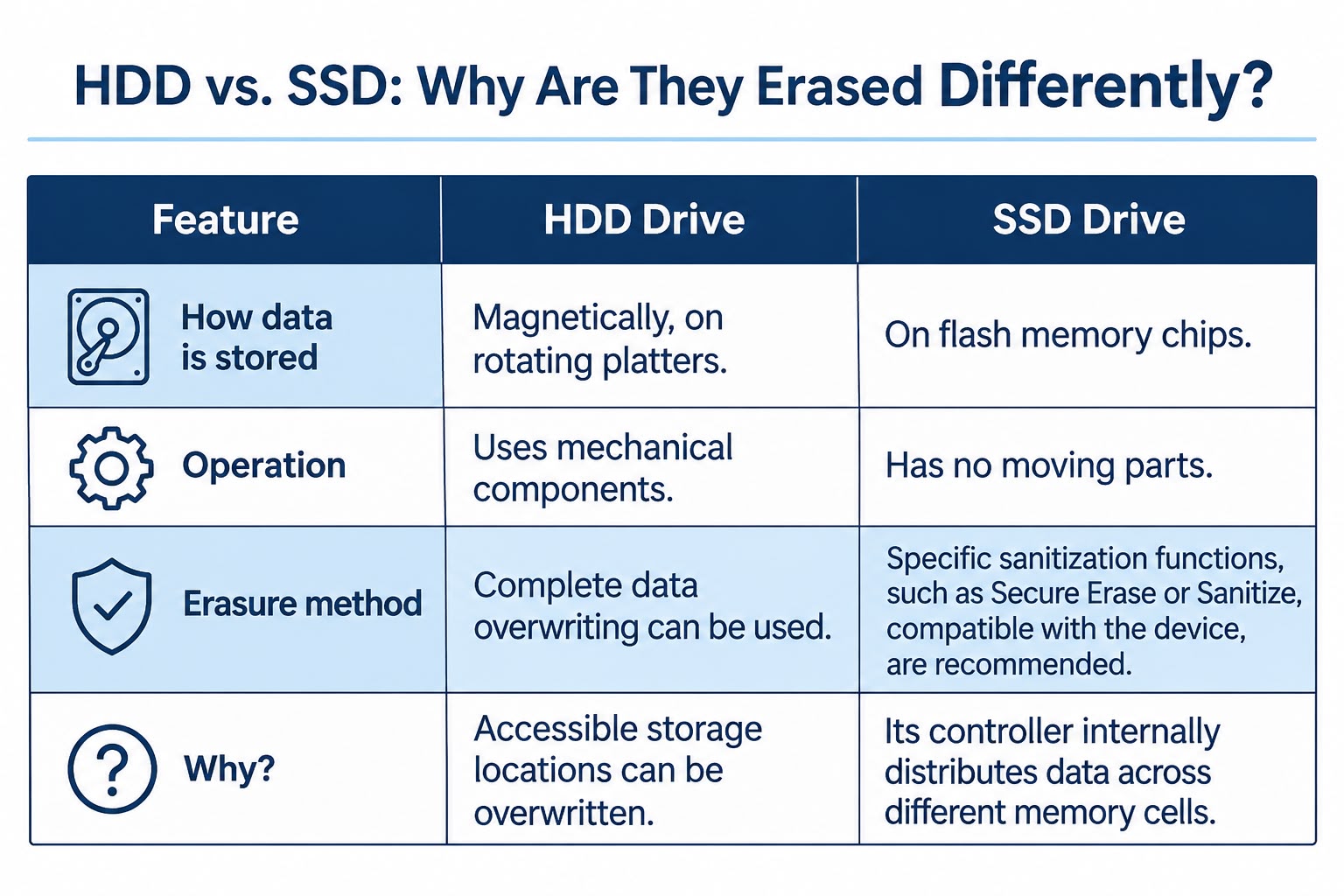
Not all devices store information in the same way. Therefore, secure erasure methods vary depending on the technology used.
The two most common types of storage in computers are traditional hard disk drives (HDDs) and solid-state drives (SSDs).
What Does This Mean in Practice?
On a traditional hard disk drive, an erasure tool can overwrite existing information, replacing it with new data to prevent recovery.
SSDs, on the other hand, use internal mechanisms to distribute write operations and extend their lifespan.
This means that attempting to overwrite a file does not always guarantee that all of its physical copies have been erased.
For this reason, depending on the model, SSDs include special features such as Secure Erase or Sanitize, designed to remove information through procedures controlled by the device itself.
The conclusion is simple: there is no single secure erasure method that is suitable for all drives.
Does Your Computer Include a Secure Erasure Tool?
Many manufacturers incorporate features that allow users to delete information stored on drives more securely than through conventional formatting.
These tools perform specific data erasure procedures and are particularly useful when a computer is going to be sold, donated, or discarded.
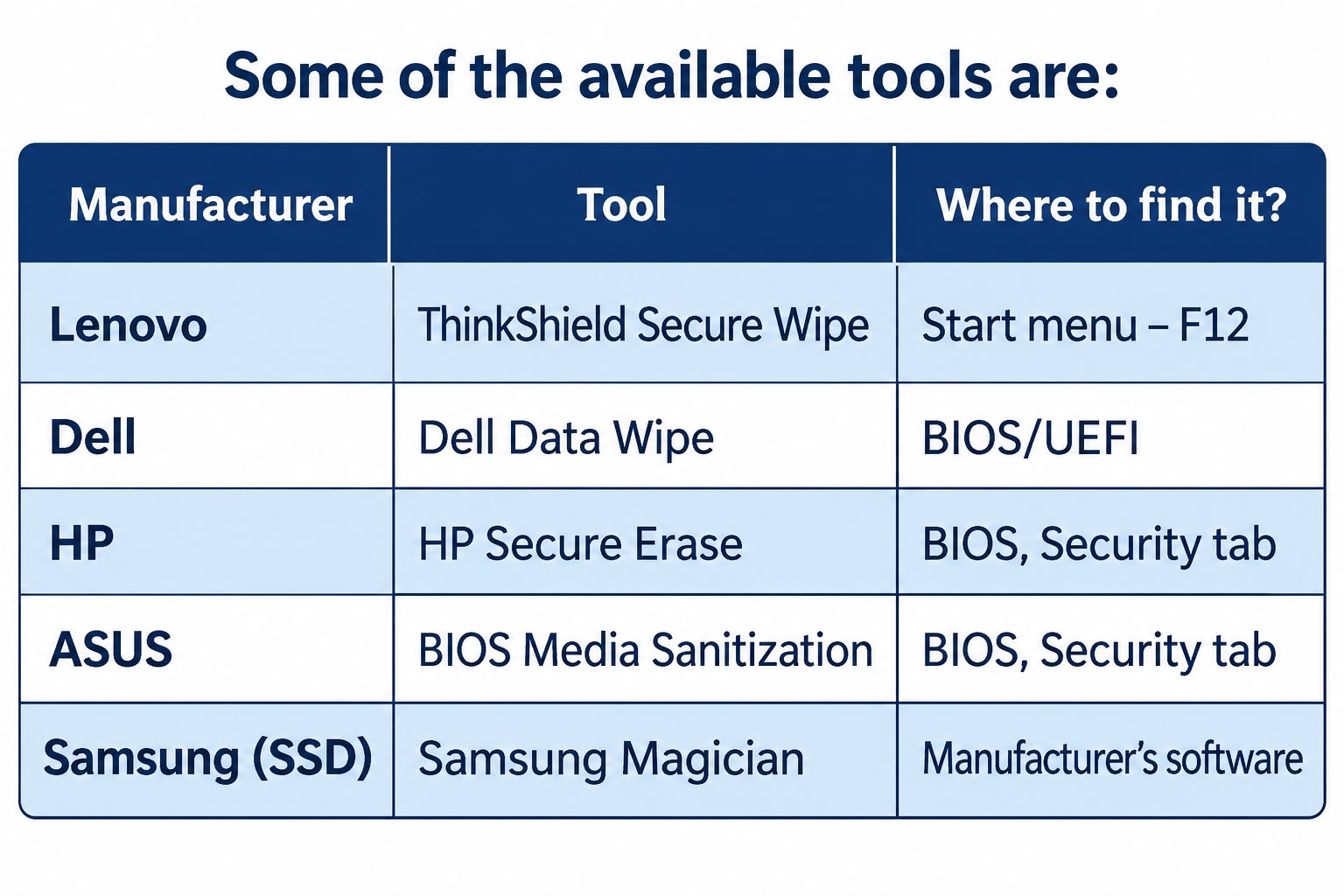
Secure erasure tools may be integrated into the BIOS/UEFI of some computers, as shown in the table, or available through specific software provided by the drive manufacturer and specialized technical utilities. Their availability depends on the computer model and the features of the storage drive.
How Are They Different from Conventional Formatting?
While a quick format may leave information recoverable, these tools allow specific secure erasure methods to be performed.
When a compatible tool is used and the process is completed successfully, the risk of information being recovered, even through specialized software, is significantly reduced.
Important: These procedures may erase all information on the selected drive, including the operating system. Before using them, it is essential to create a backup.
Before Selling, Giving Away, or Disposing of a Device
Whether it is a personal computer, a mobile phone, or a business device, it is important to take certain precautions before getting rid of it.
✔ Create a backup.
Make sure to keep all important files before starting any data erasure procedure.
✔ Sign out of accounts and unlink your services.
Remove associations with services and applications by following the manufacturer’s instructions.
✔ Use an appropriate erasure method.
Do not rely solely on deleting files or emptying the Recycle Bin. The procedure must be compatible with the type of storage device.
✔ Verify that the process has been completed successfully.
Especially with business devices, it is important to confirm that the erasure was performed correctly and keep a record of the procedure.
✔ Don’t forget other devices.
USB flash drives, external hard drives, and even some multifunction printers may retain information that also requires protection.
Protecting information does not end when we stop using a device. Ensuring its secure erasure is essential to preserving privacy and preventing unauthorized access to our data.


Laura Borroni
IT
IT
November 2026
This newsletter has been prepared by Jebsen & Co. for the information of clients and friends. Although it has been prepared with the greatest care and professional zeal, Jebsen & Co. does not assume responsibility for any inaccuracies that this bulletin may present.